 Penstock
Guide / Plans, privacy and help
Security and privacy
A complete list of what leaves your machine, when, and to whom. Nothing is sent by surprise, and nothing is sent to track you.
The short version
- Penstock has no telemetry. It does not report what you do, what you open or what your diagrams contain.
- Your diagrams leave your machine only when you deploy them, to the engine you configured.
- Passwords and secrets go to the secret store of your tool, never to a project file, and never to the web page inside the editor.
- This website sets no cookies and loads nothing from other sites. Opening the checkout is the one time a visitor's browser talks to a third party, and only after pressing a Buy button. See Opening the checkout.
Everything that talks to the network
| What | When | Where to | What is sent |
|---|---|---|---|
| Deploy | When you press Deploy, or run penstock deploy. |
The address in deployment.url. |
The file you deploy, and the credentials of the profile. Nothing else from the project. See Deployment. |
| OAuth token request | With auth.type: oauth, just before a deploy or an engine call. |
The tokenUrl you configured. |
The client id and secret, and the audience if you set one. |
| Engine questions | Only when you act: Check Workers, Monitor, Scenarios, or Open run. | The engine of the profile in force. | Requests to the engine's REST API, with the profile's credentials. The tool adds the credentials. The web page in the editor never sees them. |
| Connector templates | When you open Templates…, or press Download on a missing template. Never when your tool starts. Never when you open a diagram. At most once a day. | api.github.com (the release list of camunda/connectors) and codeload.github.com (the release archive). |
A plain HTTPS request. No credentials, no cookies, no project data. It uses the proxy settings of your tool. See Element templates. |
| Licence | Once a day, in the background. When you buy or sign in. | The licence service, Polar. | The licence, and the machine it is for: a one-way hash of the machine's own id, and the host name as a label so you can recognise it. When you sign in: your e-mail address and the code. Never a diagram. Nobody copies a key: buying opens Polar's checkout and Penstock polls it, and signing in is an e-mail code. See Buying and signing in. |
| The command line download | The first time a project needs a version of the penstock command that is not on the machine. That includes the commands a tool runs for you when the project has no penstockw. |
The npm registry, package @kern0x1b/penstock-cli. |
A normal npm install request. |
| Pull request comments | When penstock bot or penstock report runs in your pipeline. |
Your own Git host. | The comment, using the pipeline's own token. See Pipelines, reports and the bot. |
| The checkout | Only when you press a Buy button on the Plans page, or buy from your tool. | Polar, the merchant of record. The address is a Polar checkout link. | Your browser asks Polar for its checkout page, so Polar sees your address and what your browser sends to any web page. What you type there, such as your e-mail and card, goes to Polar and not to Penstock. See Opening the checkout. |
| The education link | When you press the link. | Your browser. | Nothing from Penstock. |
That is the whole list. There is no update polling, no crash reporting and no usage statistics. Share as HTML and Import work entirely on your machine.
What a deployment sends
One request per deployment. It carries the file you deploy, as multipart form data, and the deployment settings from penstock.yaml (name, source, tenant). It does not carry other diagrams, element templates or the settings file. The request is made by your tool, not by the web page in the editor, so no CORS setup is needed on the engine. Timeouts are 10 seconds to connect and 30 seconds for the request.
Credentials
- In an editor the password or client secret goes into the secret store of your tool, once for each profile.
- The web page in the editor never reads a secret. It is told only whether a secret is saved. Leave the field empty to keep it. Type to replace it.
- On the command line the secrets come from
PENSTOCK_PASSWORD,PENSTOCK_CLIENT_SECRETandPENSTOCK_TOKEN. - Nothing secret is ever written to
penstock.yamlorpenstock.local.yaml. - Penstock has no option to skip TLS certificate checks. An engine with a private certificate must be trusted by the runtime of your tool.
Scenario runs are safe by design
A scenario run deploys a test build of its own. Every process, decision, form and the calls between them in that build carries a penstock.<run>. prefix, so the engine never takes it for a version you deployed, and what is left on the engine afterwards is what you deployed. Every resource is marked with the run, so an interrupted one can be cleaned up by the next.
- It goes only to an engine marked
deployment.forTests: true, or to a local engine on this machine after one confirmation. In the editor it asks once per profile. In a terminal it asks once per run. A pipeline is never asked: without theforTestsmark, the run is refused. - Afterwards it removes the build and its instances.
- The host enforces the same rule itself. Every call of a run, and anything that deletes, cancels, answers jobs or writes variables, is refused on any other engine.
- A list of deployed builds is kept (
~/.penstock/test-builds.jsonfor the command line), so the next run can remove what an interrupted one left. - Traces are written only under the project's
.penstock/runs/, which has its own.gitignore.
Trust
- Commands that a tool starts for you, and
preDeployandpostDeployhooks run from an editor, run only in a project you have marked as trusted in that tool. - The review bot reads diagrams and
penstock.yaml. It never runs the hooks that a pull request's configuration might declare. - The review bot answers a
/penstockcomment only from someone who is an owner, a member or a collaborator of the repository, and never on a pull request from a fork. It says so in one line naming both repositories, and does not check the fork out or run anything from it, so a fork cannot be executed with a token that writes to the repository. - The MCP server takes absolute paths. When the AI client tells it which folders are open (MCP roots), it refuses everything outside them.
The shared HTML file
A file made with Share as HTML loads nothing and sends nothing. It makes no network request, uses no CDN, has no telemetry, and carries a content security policy that forbids all of it.
Opening the checkout
The Buy buttons on the Plans page are links to a Polar checkout page. Pressing one opens Polar's page, either in a new page or, where the site has switched it on, in a frame over this one. Either way it is Polar's page that loads. Polar sees the visit, and whatever you type there goes to Polar. Penstock never sees your card.
- Nothing else on this site contacts a third party. No page loads a font, a script, an image, a counter or a stylesheet from another site. Reading the guide, the rules and the licence sends nothing to anyone but the server that hosts this site (GitHub Pages).
- The prices are read at build time, when the site is generated, and are part of the page. Your browser does not ask Polar for them.
- The access token stays with the owner. It is used only on the machine that builds the site. It is never in the site or in the repository.
- Without JavaScript the Buy button still works. It is an ordinary link.
- The button that opens the checkout in a frame uses Polar's own script,
@polar-sh/checkout(Apache-2.0). It is served from this site, not from a CDN, and it does nothing until you press a Buy button. Its licence is in vendor/polar-checkout/LICENSE.txt.
This website
The pages you are reading are plain HTML and one style sheet. They set no cookies and load no fonts, images or code from other sites. The font, JetBrains Mono, is served from this site. Nothing tracks visitors. GitHub, which hosts the site, keeps its own server logs. Apart from the checkout above, the only links that leave this site are ordinary links that you click.
Report a vulnerability
Do not open a public issue. Read SECURITY.md and report it privately.
What is specific to your tool
JetBrains
- Secrets are kept in the IDE password safe, once for each profile.
- The Run Penstock commands in the tool window, and the
preDeployandpostDeployhooks of an IDE deploy, run only in a trusted project. From IDE 2025.2 the IDE's own Trust Project decides, and Penstock never overrides it. On 2024.2 and 2025.1 Penstock asks itself, in a dialog that names the command, and keeps the answer in~/.penstock/trusted-projects.json. Without apenstockwin the project, the IDE runsnpx @kern0x1b/penstock-cli, which downloads the command from npm the first time. - A private certificate must be trusted by the Java runtime of the IDE. Penstock never skips the check.
- The connector download uses the IDE proxy settings.
VS Code
- Passwords and client secrets are kept in VS Code's secret storage, once for each workspace, profile and field.
- The
preDeployandpostDeployhooks ofpenstock.yamlrun only in a trusted workspace. - Files are read and written only inside the workspace folders, or where you chose in a dialog.
- The connector catalogue is downloaded on demand into
~/.penstock/connectors, with a cap of 64 MB.
Command line
- Secrets come from
PENSTOCK_PASSWORD,PENSTOCK_CLIENT_SECRETandPENSTOCK_TOKEN. Set them in the environment of the command, never in a file. - A
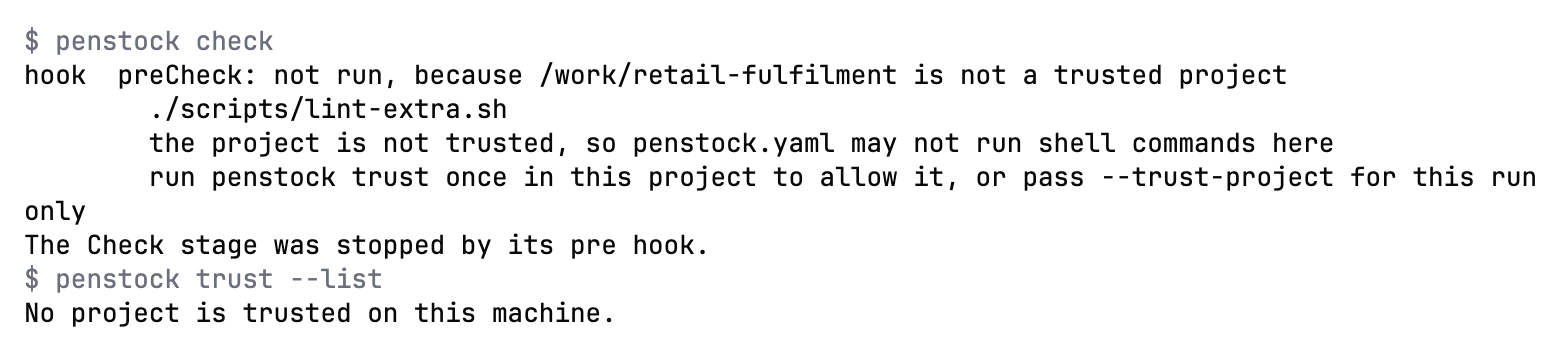
hooks:command frompenstock.yamlruns forcheck,layoutanddeployonly in a project you have trusted withpenstock trust, or for one run with--trust-project. Inside a pipeline, whereCIis set, hooks run without a question. A hook sees onlyPENSTOCK_FILES,PENSTOCK_ROOT,PENSTOCK_STAGEandPENSTOCK_PROFILE, never the licence key, a password or a token. - The wrapper downloads the pinned version from npm once, into
~/.penstock/wrapper. After that it runs offline. - The connector download uses
HTTPS_PROXYandHTTP_PROXYwhen they are set.
Common problems
- My firewall shows a request to GitHub from my tool.
- You opened the connector browser, or pressed Download on a missing template. That is the only GitHub request. It is at most once a day.
- My firewall shows a request to npm.
- A command line action needed a version of
@kern0x1b/penstock-clithat was not on the machine.penstock initadds a wrapper that pins the version and keeps the download in~/.penstock/wrapper. - I work offline.
- Everything works offline except deploy, engine questions, the connector download and the licence check. An active licence works 30 days without a connection.